Overview
KaadzOS is a minimal Debian 13 (trixie) live image with a hand-built Sway/Wayland desktop, a pure-black AMOLED theme rendered from one palette, an on-demand pack system, and a Calamares installer. It boots on BIOS and UEFI, installs to disk, and is built and tested entirely in GitHub Actions.
Base
Debian 13 trixie, amd64
Session
Sway on Wayland, with Waybar, foot, fuzzel, mako and swaylock
Image
Hybrid ISO, about 1.4 GB, Syslinux BIOS + GRUB UEFI
Validation
Built, booted twice and installed twice before any release
Most of the design is forced by the environment, and that is the point.
- No Hyprland
- Hyprland is not in Debian stable, and the image builds from the archive with
--apt-recommends false. Sway is in trixie, so Sway is the desktop. - POSIX sh
- The pack manager is a shell script at
/usr/local/bin/kaadzos. The base carriespython3only for Calamares and the install finaliser; the CLI itself only orchestratesapt,dpkg,curlandsystemctl. - CI-only
- The ISO is not built on a development machine. Every push that changes the image builds it, boots it under both firmwares, and drives an unattended install. A tag ships only what that matrix proved.
- One palette
theme/paletteis the single source of truth. Every themed surface is rendered from it, including the boot splash, installer and virtual console.- Opt-in weight
- AI tooling, Android, Windows apps, gaming, creative suites and dev chains are declarative packs, not base-image payload.
What you need
KaadzOS runs on ordinary amd64 hardware and in QEMU. You do not need a build machine to install it.
| Item | Requirement |
|---|---|
| CPU | x86-64, with UEFI or legacy BIOS. AMD64 only. |
| Memory | The CI live session idles at roughly 310 MiB with zram active. 1 GB is comfortable; packs want more. |
| USB | A 2 GB or larger stick. The ISO is about 1.4 GB. |
| Firmware | Secure Boot disabled for the live USB. The installed system supports Secure Boot. |
| Network | Optional for the live desktop. Required for packs, the APT archive and updates. |
| Disk | A target disk or partition you can erase. The CI install test uses a 12 GB virtual disk. |
Download & verify
Releases are published by CI only after the full validation matrix passes. Every release carries the image, its checksum, a detached signature and the archive public key. The canonical assets are on GitHub Releases and mirrored under https://iso.kaadzos.pages.dev/releases/<tag>/.
| Asset | What it is |
|---|---|
KaadzOS-trixie-amd64.iso | The hybrid live/install image, about 1.4 GB. |
KaadzOS-trixie-amd64.iso.sha256 | SHA-256 checksum for the image. |
KaadzOS-trixie-amd64.iso.sha256.asc | Detached signature for the checksum. |
kaadzos-archive-keyring.asc | The public key that signs the release checksum and the APT archive. |
Verify the checksum
sha256sum --check KaadzOS-trixie-amd64.iso.sha256

# KaadzOS-trixie-amd64.iso: OK
Verify the signature
The same key signs the release checksum and the signed APT archive. Import it from the release, then verify the checksum file.
gpg --import kaadzos-archive-keyring.asc
gpg --verify KaadzOS-trixie-amd64.iso.sha256.asc \
  KaadzOS-trixie-amd64.iso.sha256
Write the USB
# replace sdX — this erases the target device
sudo dd if=KaadzOS-trixie-amd64.iso \
  of=/dev/sdX bs=4M status=progress oflag=sync
The image is hybrid: the same file boots from a USB stick under BIOS or UEFI. On Windows, write it with Rufus or balenaEtcher in DD mode, not in ISO-copy mode.
Boot the live image
Insert the stick and select it in the firmware boot menu. The live session is read-only and runs entirely in RAM; nothing on the USB is modified.
- Pick the firmware entry. UEFI boots through GRUB, legacy BIOS through Syslinux. The menu waits 5 seconds on GRUB and 10 seconds on Syslinux before the default.
- Watch the splash. Plymouth shows the AMOLED KaadzOS mark, then hands the display to Sway.
- Land in the session. The live user is
kaadzos, with passwordless sudo for pack installs. Waybar, a welcome terminal and a one-time installer notification appear. Sway has no desktop icons.
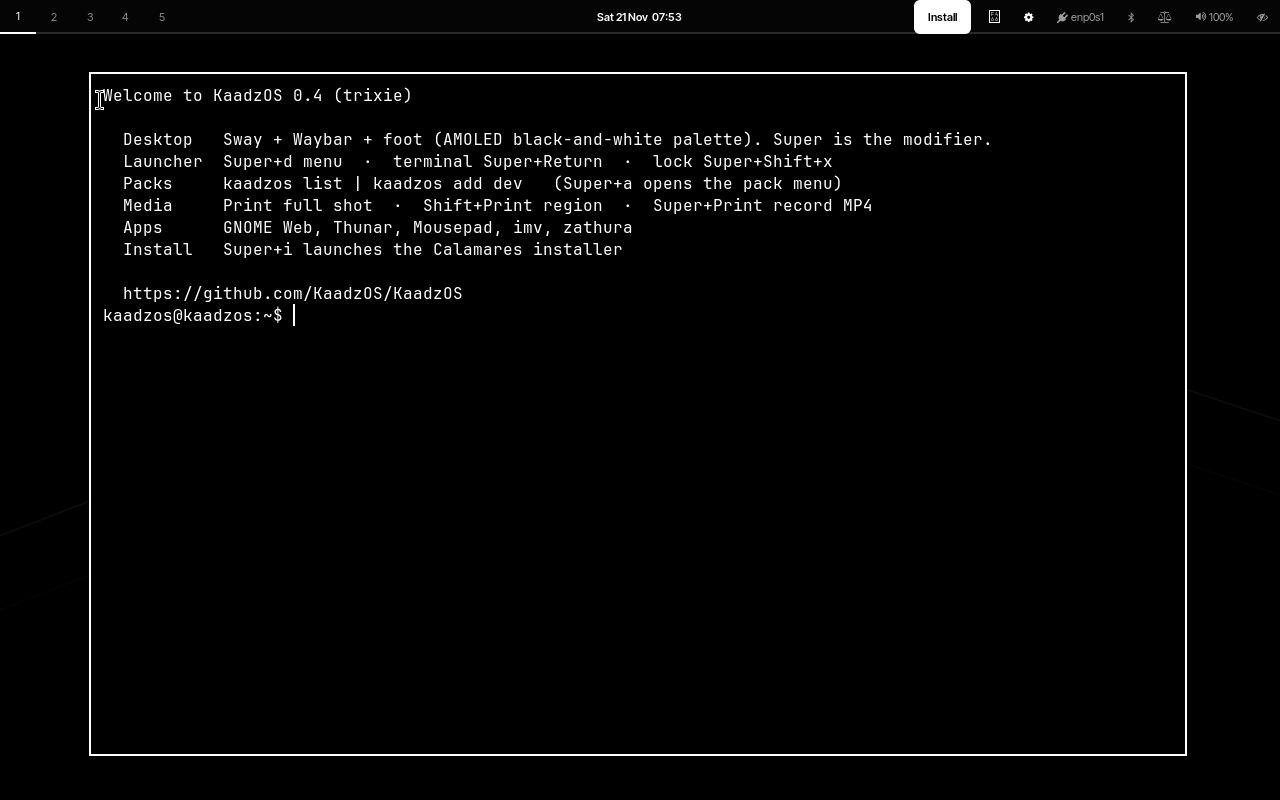
Network
NetworkManager is enabled and Waybar shows link state. If you booted straight into Sway, connect from a terminal with nmtui; the live image does not ship a graphical connection editor.
Install from the desktop
Use the white Install button in Waybar, press Super+I, or run kaadzos-install in a terminal. That wrapper preserves the Wayland environment and pins the Calamares configuration.
The desktop
Sway is a tiling Wayland compositor. The default session is deliberately small: a launcher, a bar, a terminal, notifications, a locker and a focused set of lean applications. Everything is driven from the Super key.
| Role | Default | Notes |
|---|---|---|
| Browser | GNOME Web (Epiphany) | WebKitGTK, native Wayland, the smallest full browser in trixie. |
| Files | Thunar | Wired through mimeapps.list and user-dirs.dirs. |
| Text | Mousepad | Plain, fast, no session daemon. |
| Images | imv | Wayland-native image viewer. |
| zathura | with zathura-pdf-poppler. | |
| Terminal | foot | Wayland-native, themed from the palette. |
| Launcher | fuzzel | Super+D. |
| Notifications | mako | AMOLED surfaces, white text. |
| Screen lock | swaylock | Locks after 10 minutes idle and before sleep. |
Waybar
The bar carries workspaces, the clock, network state, volume, and a white Install button. The button is hidden on an installed system. The bar is themed from the same palette as every other surface; there is no separate configuration to keep in sync.
Screenshots and recording
- Print saves a full screenshot to
~/Pictures/Screenshot-*.png. - Shift+Print selects a region with
slurpfirst. - Super+Print toggles screen recording with
wf-recorderand writes~/Videos/KaadzOS-*.mp4. Audio is off by default.
Memory and idle behaviour
zram-tools creates a zstd swap sized at half of RAM, paired with vm.swappiness=180 and vm.page-cluster=0. The boot test reports archive RAM and zram state on every CI run. swayidle locks the session after 600 seconds and before sleep.
Keyboard shortcuts
Super is the modifier. The bindings are generated into ~/.config/sway/config; editing that file directly is fine, but a theme regeneration will overwrite it.
Launch and system
| Action | Keys |
|---|---|
| Terminal | Super+Return |
| Launcher | Super+D |
| Add-ons menu | Super+A |
| Installer | Super+I |
| Close window | Super+Q |
| Lock session | Super+Shift+X |
| Reload config | Super+Shift+C |
| Restart Sway | Super+Shift+R |
| Exit menu | Super+Shift+E |
Focus and movement
| Action | Keys |
|---|---|
| Focus left / down / up / right | Super+H J K L or arrow keys |
| Move window left / down / up / right | Super+Shift+H J K L |
| Toggle tiling / floating focus | Super+Space |
| Toggle floating | Super+Shift+Space |
Layout
| Action | Keys |
|---|---|
| Split horizontally / vertically | Super+B / Super+V |
| Stacking layout | Super+S |
| Tabbed layout | Super+W |
| Toggle split layout | Super+E |
| Fullscreen | Super+F |
| Resize mode | Super+R, then H J K L; Return or Escape exits |
Workspaces
| Action | Keys |
|---|---|
| Switch to workspace 1–10 | Super+1 … 0 |
| Move window to workspace 1–10 | Super+Shift+1 … 0 |
| Next / previous workspace | Super+Tab / Super+Shift+Tab |
Capture and media
| Action | Keys |
|---|---|
| Full screenshot | |
| Region screenshot | Shift+Print |
| Toggle recording | Super+Print |
| Volume and mute | XF86AudioRaiseVolume, LowerVolume, Mute |
| Brightness | XF86MonBrightnessUp / Down |
Packs
The base image stays small. Heavy software is installed on demand from packs: plain key=value files that declare apt packages, an optional signed third-party repository, an optional hook, and the space they need. The pack manager is idempotent and only escalates when it has to.
| Pack | What it installs | Size |
|---|---|---|
admin | Synaptic, pkexec, gvfs-backends and the polkit agent. | ~45 MB |
ai | Ollama, whisper.cpp and Piper voice helpers for a local AI stack. | ~5 GB |
android | Waydroid, with Waydroid's signed trixie repository. Requires Wayland. | ~3 GB |
cloudflare | cloudflared, an architecture-matched static binary. | ~60 MB |
creative | GIMP, Inkscape, Krita and Blender. | ~3 GB |
dev | Git, compilers, Node, Python and Neovim. | ~900 MB |
fonts | Noto core, emoji and monospace families. | ~55 MB |
gaming | Wine, winetricks, GameMode and MangoHud. | ~2 GB |
hardware | Firmware, disks, SMART, NVMe, sensors and display tools. | ~300 MB |
input | fcitx5 with GTK, Qt and Chinese frontends. | ~20 MB |
network | VPN plugins, WireGuard and NetworkManager connection tools. | ~40 MB |
opencode | Pinned upstream OpenCode coding agent, consent-gated. | ~250 MB |
printing | CUPS, printer drivers, scanning and network discovery. | ~250 MB |
privacy | Tor, Unbound and MAC randomisation. | ~150 MB |
security | ufw and gufw firewall configuration. | ~10 MB |
windows | Wine, the Bottles stack, flatpak and i386 multiarch. | ~4 GB |
Commands
kaadzos list              # packs, status and size
kaadzos status            # system and installed-pack state
kaadzos add dev           # install, idempotent
kaadzos remove dev        # remove, idempotent
kaadzos --dry-run add ai  # print every command
kaadzos update            # refresh indexes and upgrade
kaadzos addons            # the fuzzel Add-ons menu
How add and remove behave
- State lives in
/var/lib/kaadzos/installed, so repeatingaddorremoveis safe. add,removeandupdateescalate withsudo -Eonly when not root.list,statusandaddonsnever need root.- Requirements are checked before anything changes:
wayland,binder,kvm, or a command inPATH. --dry-runorKAADZOS_DRY_RUN=1prints the plan without touching the system.KAADZOS_PACKS_DIRandKAADZOS_STATE_DIRsupport alternate roots for testing.- Packs are not a sandbox. apt installs system packages and hooks run as root.
The Add-ons menu
Super+A opens the same pack list in fuzzel. Selecting an available pack installs it in a terminal; selecting an installed pack removes it. The menu itself runs unprivileged and escalates only the chosen action.
Writing a pack
Packs are canonical in packs/<name>.pack. CI stages them into the image at /usr/share/kaadzos/packs; the staged copy is gitignored so the repository stays single-source. Hooks live in packs/hooks/<hook>.sh and receive add or remove.
| Key | Meaning |
|---|---|
name | Required. Must match the filename without .pack. |
description | Required. One line for list and the Add-ons menu. |
size | Human-readable installed size, for display only. |
requires | Space-separated checks: wayland, binder, kvm, or a command name. |
apt | Packages passed to apt-get install. |
repo-url | Optional third-party apt repository; the key is imported and a signed-by source is written. |
repo-suite | Repository suite. Defaults to trixie. |
repo-components | Repository components. Defaults to main. |
repo-key | URL of the repository signing key, armored or binary. |
hook | Optional script name under packs/hooks/. |
name=dev
description=Git, compilers and editors for software development
size=900MB
apt=git curl wget build-essential make cmake python3 python3-venv nodejs npm neovim
A pack must do at least one of apt, repo-url or hook; an empty pack is rejected. ci/test-packs.sh resolves every pack against trixie and exercises the CLI's dry-run, gating, idempotency and error paths on every build push, so a broken definition fails in about a minute instead of at the end of an ISO build.
Installing to disk
Calamares is included in the live image. It does not debootstrap a new system: it unpacks the live squashfs onto the target and repairs the copy in place. That keeps the installed system close to the exact image CI booted.
Launch it
- the white Install button in Waybar, shown only in the live session;
- Super+I;
kaadzos-installin a terminal;- the “Install KaadzOS” entry in fuzzel.
The flow
- Welcome and language. US English by default; the CI driver forces it so keyboard navigation is deterministic.
- Location. The locale map is filtered to neutral greys by
kaadzos-calamares-map.so, preserving alpha for timezone hit-testing. - Keyboard. US layout by default.
- Partitions. Choose the target disk. This erases it.
- User. The hostname is preset as
kaadzos-<user>. - Summary, then install. The partition bars are monochrome: a build hook rewrites Calamares' hardcoded Breeze colours to same-length greys. The progress page uses a pre-rendered AMOLED slide rather than a QML scene, so the first frame is black and the text cannot race rendering.
During the copy, Calamares unpacks the squashfs with unsquashfs and rsync, purges live-only packages before generating the initramfs, removes the live NOPASSWD sudo rule and CI configuration, writes the bootloader, and enables greetd for the installed system.
The installed system
It boots through greetd and tuigreet into the same Sway session. The Install button and the live sudo rule are gone. Secure Boot is supported through Debian's signed shim and GRUB; the live image itself remains unsigned and needs Secure Boot disabled. There is no in-place theme upgrade path between releases: moving from 0.3.x to 0.4.0 means installing the new image.
Bluetooth
Bluetooth is part of the base image: BlueZ, Blueman, dconf-gsettings-backend and libglib2.0-bin. The explicit GLib packages matter because apt recommends are off. A build hook enables bluetooth.service, but Debian's unit carries ConditionPathIsDirectory=/sys/class/bluetooth: on a machine without an adapter the unit is skipped rather than failed, and udev pulls in bluetooth.target when hardware appears.
The bar module
Waybar's built-in bluetooth module is in the generated bar. It is muted when the adapter is off, unavailable or absent; white when powered on or connected; shows the connected device name and battery percentage when BlueZ exposes it; and adds a discovering class while scanning. Left-click opens Blueman, right-click toggles adapter power, and Super+X opens Blueman from the keyboard.
kaadzos-bluetooth manager
kaadzos-bluetooth toggle
kaadzos-bluetooth on
kaadzos-bluetooth off
kaadzos-bluetooth statusControl centre
kaadzos-control is one POSIX-sh helper behind the gear in Waybar, Super+Shift+S and the Control Centre desktop entry. It adds no daemon of its own. Every optional command is probed before a row is offered, so a missing tool disables one item instead of breaking the menu.
| Section | Tool used when present |
|---|---|
| Sound | wpctl / WirePlumber |
| Network | nm-connection-editor, falling back to nmcli |
| Brightness | brightnessctl |
| Power profile | powerprofilesctl |
| Night light | wlsunset |
| Battery | upower |
| Bluetooth | Blueman / kaadzos-bluetooth |
| Session | Reboot and power off, confirmed with zenity |
The base image adds upower, power-profiles-daemon, wlsunset and zenity so those rows are useful on a laptop. The generated bar gains backlight, power-profiles-daemon, idle_inhibitor and custom/control; battery left-click opens the power section and network left-click falls back to the control centre when the connection editor is absent. The session marker is KAADZOS_CONTROL_OK.
Settings
kaadzos-settings is the single zenity-backed settings helper behind Super+, and the Settings desktop entry. It covers appearance (wallpaper, night light, dark/light style, interface font, icon theme), input (keyboard layout, touchpad tap), display, network, Bluetooth, sound, power, default browser/file manager and About. Each row probes its command before it is shown.
Where changes are stored
Wallpaper, keyboard and touchpad overrides are written atomically through kaadzos-file-action into ~/.config/sway/config.d/. Only *.conf files are included; an inert README and default file explain the directory. Preferences such as style and night-light state live in ~/.config/kaadzos/settings.conf. Regenerating the theme never overwrites these user overrides.
Filename safety
kaadzos-file-action takes paths as arguments, never evaluates them, and refuses empty values, leading dashes, control characters, $ and backticks. The helper is shared by Thunar and Settings, so the same rule protects wallpaper changes and custom actions. The session marker is KAADZOS_SETTINGS_OK.
Search
Super+D runs kaadzos-search. It builds one TAB-separated list from desktop entries, recent files, the 200 newest files under $HOME, settings pages, installed/available packs and a fixed command map, then passes the selected line to fuzzel --dmenu. Super+Shift+D keeps the plain launcher.
| Selection | Action |
|---|---|
| Desktop entry | gio launch |
| File | xdg-open |
| Settings page | kaadzos-settings <section> |
| Pack | kaadzos add <pack> in foot |
| Command | Dispatch from a fixed map |
The home scan is depth-limited and bounded by timeout 2. Recent files are decoded from $XDG_DATA_HOME/recently-used.xbel, and a missing state file is fine. The scan prunes .ssh, .gnupg, keyrings, browser profiles, trash, caches, node_modules and .git; names with control characters or newlines are dropped and leading-dash values are refused. Nothing is evaluated as shell, and cancelling fuzzel does nothing.
Package management
kaadzos-packages is the base front page behind Super+Shift+P, the Waybar package module, the Packages desktop entry and the Settings row. It opens Synaptic when the optional admin pack is installed, offers that pack when it is not, refreshes apt indexes, and lists the declarative packs. apt is called through pkexec, or passwordless sudo in the live session; no privileged daemon is added.
Local packages
kaadzos-packages install-deb PATH requires one absolute, readable .deb. It warns that maintainer scripts run as root, asks for confirmation with zenity, and keeps failed apt output in ~/.cache/kaadzos/apt.log. Install and remove validate the package name and pass it as one argv; remove defaults to cancel. A locked dpkg is reported separately from an unreachable archive.
Printing & scanning
Printing is not in the base ISO. Install the printing pack to get CUPS, cups-filters, printer-driver-all, system-config-printer, cups-browsed, Avahi/mDNS, sane-utils, sane-airscan and simple-scan. A pack hook enables the services after installation.
kaadzos add printing
system-config-printer
simple-scan
Network printers are discovered through Avahi and libnss-mdns; AirScan and SANE cover most network and USB scanners. Nothing in the boot or session gates depends on CUPS, so a machine without printers pays no runtime cost.
Hardware tools
The hardware pack collects tools that are useful on some machines but pointless in a minimal base: fwupd with Debian's signed firmware metadata, gnome-firmware, gnome-disk-utility, GParted, nwg-displays, smartmontools, nvme-cli, gsmartcontrol, lm-sensors, testdisk and filesystem tools for NTFS, exFAT, btrfs and XFS.
Display configuration is deliberately here rather than in the base. Wayland output layout is normally handled by Sway and the Settings display row; nwg-displays is available when a graphical editor is useful. Firmware updates, SMART checks and disk repair all require hardware access and are therefore opt-in. ci/test-packs.sh resolves every name in a trixie container and runs the pack hook without building an ISO.
VPN & firewall
The network pack adds NetworkManager's OpenVPN and OpenConnect plugins, WireGuard tools, nm-connection-editor and network-manager-gnome. Connections are then managed from the Network panel in the control centre or from nmcli; no VPN is configured or started by default.
The security pack adds ufw and its GTK front end gufw. It is also opt-in: enabling a firewall changes network behaviour, so the base image does not do it for you. A typical server-style default is deny incoming and allow outgoing:
kaadzos add security
sudo ufw default deny incoming
sudo ufw default allow outgoing
sudo ufw enable
gufw
Rules persist on an installed system. In the live session they disappear on reboot because the root filesystem is ephemeral. The pack contains no keys, credentials, daemon beyond ufw's own service, or preconfigured profile.
Fonts
The interface face is Inter Tight. Debian's fonts-inter ships Inter and InterDisplay but not the Tight variable family, so the OFL-licensed variable TTFs are vendored into /usr/share/fonts/truetype/kaadzos/. KAADZ_FONT_UI="Inter Tight" is wired through Sway, Waybar, foot, fuzzel, mako, swaylock, GTK/Qt and the Calamares QSS. Terminals use JetBrains Mono and fall back to DejaVu Sans.
Wider language coverage is a pack, not a base dependency. kaadzos add fonts installs fonts-noto-core, fonts-noto-color-emoji and fonts-noto-mono. The website self-hosts the same Inter Tight variable font, and its React Bits licence is recorded in site/src/components/LICENSE.md.
Input methods
Keyboard layout and touchpad tap-to-click are base Settings rows written through atomic Sway config.d files; they need no extra daemon. Non-Latin text entry is optional. The input pack installs fcitx5, fcitx5-configtool, the GTK and Qt frontends and fcitx5-chinese-addons.
kaadzos add input
fcitx5-configtool
Add these variables to ~/.config/environment.d/60-kaadzos-fcitx.conf, then log out and back in so the compositor and toolkits pick them up:
GTK_IM_MODULE=fcitx
QT_IM_MODULE=fcitx
XMODIFIERS=@im=fcitx
fcitx5 does not start automatically and has no privileged component. Wayland-native GTK applications use the frontend through XWayland where needed; pure Sway keybindings are unaffected.
OpenCode
OpenCode is an optional coding agent, not part of the base image. kaadzos add opencode downloads a pinned v2.3.2 archive over HTTPS, verifies its SHA-256 before extraction, and installs /usr/local/bin/opencode plus a desktop entry. There is no latest URL, install script, apt repo, key, credential, sudo rule, daemon or auto-start. amd64 and arm64 are the only supported architectures.
| Asset | SHA-256 |
|---|---|
opencode-linux-x64.tar.gz | 563b5d663637226b6e3bb4bb6803281bc39b0d2cd88db06d674b6420aab009b0 |
opencode-linux-arm64.tar.gz | 9d10185acdb72336e086e699ca363a6065f410fd3c1caed0dc8046e95ac06ccb |
The desktop entry, Settings row and Search result all run kaadzos-opencode [DIRECTORY]. On first use the helper asks for per-directory zenity consent, states that the agent can read and change files and run commands in that directory, and records only the accepted path in ~/.config/kaadzos/opencode-consent. Cancel changes nothing. Paths are validated and never evaluated as shell.
APT archive
The optional signed archive lives at https://iso.kaadzos.pages.dev/apt for suite trixie, component main, architecture amd64. It carries kaadzos-pack-defs, the canonical pack definitions and hooks, so an installed system can receive new packs through apt upgrade instead of a new ISO. It is not a replacement for the Debian archive.
| Path | Purpose |
|---|---|
apt/dists/trixie/InRelease | Clear-signed Release file, read first by apt. |
apt/dists/trixie/Release.gpg | Detached signature for older clients. |
apt/dists/trixie/main/binary-amd64/Packages.* | Package indexes, plain and compressed. |
apt/pool/main/.../*.deb | Packages in the conventional pool layout. |
apt/kaadzos-archive-keyring.gpg | Binary public key for Signed-By. |
apt/kaadzos.sources | Ready-to-copy deb822 source stanza. |
Images from 0.2.1 onward ship the keyring and source stanza when the archive is reachable at build time, so a fresh install can run sudo apt update immediately. For an older image or a manual setup, install both files:
curl -fsSL https://iso.kaadzos.pages.dev/apt/kaadzos-archive-keyring.asc \
  | sudo gpg --dearmor -o /usr/share/keyrings/kaadzos-archive-keyring.gpg

sudo curl -fsSL https://iso.kaadzos.pages.dev/apt/kaadzos.sources \
  -o /etc/apt/sources.list.d/kaadzos.sources

sudo apt update
sudo apt install kaadzos-pack-defs
Verify the archive
curl -fsSL https://iso.kaadzos.pages.dev/apt/dists/trixie/InRelease | head
curl -fsSL https://iso.kaadzos.pages.dev/apt/kaadzos-archive-keyring.asc \
  | gpg --show-keys

sudo apt update
apt-cache policy kaadzos-pack-defs
The archive is signed by the same key as the release checksum (fingerprint 7FC3 1B27 E931 570B 2D8C 3E42 9A4F 8D9E 9D5B 0C7A). Key rotation is trust-on-first-use: a system that already trusts the old key cannot bootstrap the new one automatically, so keep the old key available until the last image that shipped it is out of support.
To return to a stock Debian-only apt setup, remove /etc/apt/sources.list.d/kaadzos.sources and /usr/share/keyrings/kaadzos-archive-keyring.gpg.
Theming
theme/palette is the single source of truth. It holds the raw colours, semantic roles, fonts and sizes; theme/generate.sh renders every generated surface from those values. Changing a colour is a one-file edit plus one regeneration.
- #000000Background
- #ffffffText / accent
- #9c9c9cSecondary
- #292929Hairline
| Token | Value | Role |
|---|---|---|
KAADZ_BLACK | #000000 | True-black background. |
KAADZ_MANTLE | #050505 | Almost-black bars and raised base. |
KAADZ_SURFACE | #0a0a0a | Cards, popups and menus. |
KAADZ_OVERLAY | #161616 | Hover and overlay surfaces. |
KAADZ_BORDER | #292929 | Hairlines, separators, outlines. |
KAADZ_TEXT | #ffffff | Primary text and the white accent. |
KAADZ_SUBT1 | #9c9c9c | Secondary text. |
KAADZ_SUBT0 | #8a8a8a | Muted and disabled text. |
KAADZ_RED | #ff5c5c | Errors and urgent state only. |
KAADZ_GREEN | #c0c8c0 | Muted terminal success, not a UI colour. |
KAADZ_YELLOW | #d6c08a | Muted terminal warning, not a UI colour. |
# from the repository root
sh theme/generate.sh
The script writes Sway, Waybar, foot, fuzzel, mako, swaylock, GTK3/4, Qt6ct, the wallpaper, the virtual-console palette, the Plymouth splash and the Calamares branding. The boot-menu artwork and overrides are hand-authored from the same values. If Python and Pillow are available, the script also regenerates the raster artwork and the install slide; otherwise the committed PNGs are kept, so a machine without Python still builds a complete image.
Typography
The UI face is Inter Tight, the same variable family as this website. Debian's fonts-inter package ships Inter and InterDisplay but not Inter Tight, so the variable TTFs are vendored under config/includes.chroot/usr/share/fonts/truetype/kaadzos/ with their OFL licence, and KAADZ_FONT_UI="Inter Tight" is wired through every generated config. JetBrains Mono remains the terminal and code face, and DejaVu Sans is the fallback. The Calamares stylesheet names the family directly because the installer runs as root without the live user's font configuration.
Artwork
All OS artwork is flat: the wallpaper, the installer welcome and slide imagery, the boot-menu splash.svg and the Plymouth background are true black with hairline contour lines and waypoint dots only. There are no gradient washes or glows, and the generated GTK CSS flattens Adwaita's headerbar and button gradient overlays. The raster pieces are committed, so a build without Python still produces the complete, identical look.
Installer surfaces
Two Calamares surfaces are not palette-configurable and are neutralised explicitly. The locale map is converted to neutral greys at load time by kaadzos-calamares-map.so, with alpha preserved for timezone hit-testing. A build hook rewrites the hardcoded Breeze partition colours — the existing, new and unknown-disklabel fills — to same-length greys, and fails the build if Calamares ever changes those strings. A Calamares upgrade therefore cannot silently reintroduce a colour bar into the Summary or Location pages.
The website is a separate design system sharing the same black-and-white editorial language. The palette governs the OS surfaces, not the site.
Troubleshooting
Start with the checksum and the firmware entry. Most “broken image” reports turn out to be a truncated download, Secure Boot, or the wrong boot mode.
| Symptom | Check |
|---|---|
| The USB does not appear in the boot menu | Verify the SHA-256 first. Disable Secure Boot for the live USB and try the other firmware entry; the image is hybrid, so BIOS and UEFI both work. |
| The screen stays black after the boot menu | Wait for Plymouth; the live session can take a moment under emulation. Confirm the display is connected to the GPU that the firmware initialised, and try the other firmware mode. |
| No network in the live session | NetworkManager is enabled. Run nmtui in a terminal and join the network there. Packs and updates need a connection; the base desktop does not. |
kaadzos-install says the installer is live-only | That is expected on an installed system. On the live image, launch it from Waybar, Super+I, or the fuzzel entry. |
calamares refuses to start | Do not run the raw binary or sudo calamares. Use kaadzos-install, which supplies the config path and preserves the Wayland environment. |
| A pack needs a Wayland session | Run the pack from the Sway session. The check fails over SSH or on a plain console because WAYLAND_DISPLAY is unset. |
| A pack needs binder or KVM | The kernel interface is missing. Enable the relevant module/device or nested virtualisation; the pack refuses to install without it. |
apt update returns 404 or NO_PUBKEY | The tag's apt-repo job may not have published yet, or the keyring is missing at the path in Signed-By. Re-run the archive setup above. |
| Checksum mismatch | Re-download the ISO. Do not write a file that failed verification. |
swaynag shows a warning bar | The Sway config emitted an error or a shadowed binding. CI fails on this deliberately; include the framebuffer screenshot and serial log in a bug report. |
| The build stops at “Qt6Gui development files are missing” | Install g++ qt6-base-dev pkg-config before sh ci/build-map-filter.sh, or skip the filter and keep the stock locale map. |
The build fails in 0510-calamares-amoled | Calamares changed its hardcoded Breeze partition palette. Update the string map in config/hooks/live/0510-calamares-amoled.hook.chroot; the hook fails on purpose rather than shipping coloured partition bars. |
| The install test seems stuck | Under TCG a full unpackfs plus initramfs run is slow; the job allows 40 minutes. Synthetic clicks are used because the Alt+N mnemonic is unreliable when a combo box has focus. |
Build the ISO
The canonical build is GitHub Actions, but the same live-build configuration runs locally in Docker or on a Debian trixie host. Budget about 10 GB of disk and five minutes of build time.
| Requirement | Why |
|---|---|
| Docker (recommended) or Debian trixie | live-build and its archive tooling. |
| ~10 GB free disk | The chroot, squashfs and ISO. |
g++, qt6-base-dev, pkg-config | Builds the Calamares locale-map filter. Optional, but the installer map stays blue/green without it. |
| Python 3 + Pillow | Only to regenerate the committed wallpaper, logo and install slide artwork. |
./auto/config
mkdir -p config/includes.chroot/usr/share/kaadzos
cp -r packs config/includes.chroot/usr/share/kaadzos/packs
sh ci/build-map-filter.sh
sudo lb build
sha256sum KaadzOS-trixie-amd64.iso
A local build without the APT signing secrets and R2 credentials skips the optional archive trust material. That is expected; the base image never depends on the archive.
Boot and install it locally
sudo apt install qemu-system-x86 ovmf socat netpbm

bash ci/test-boot.sh bios KaadzOS-trixie-amd64.iso boot-results
bash ci/test-boot.sh uefi KaadzOS-trixie-amd64.iso boot-results
bash ci/test-install.sh bios KaadzOS-trixie-amd64.iso install-results
bash ci/test-install.sh uefi KaadzOS-trixie-amd64.iso install-results
QEMU prefers KVM and falls back to TCG. The boot test drives the live menu, waits for the Sway IPC marker, dumps the framebuffer and fails if swaynag is running. The install test is the slower one: it copies the squashfs and boots the installed disk.
CI & releases
The validation matrix is the release policy. A tag does not ship an image that was built somewhere else; it re-runs the matrix for that exact commit and publishes only after every gate is green.
| Job | When | What it proves |
|---|---|---|
pack-test | Image-affecting push | Every pack resolves against trixie; dry-run, requirement gating, idempotency and error paths work. |
repo-test | Image-affecting push | A throwaway signed APT repository builds, apt installs from it, and gpgv rejects a tampered Release file. |
build | Image-affecting push | The ISO builds from scratch and its SHA-256 file matches. |
boot-test (bios) | Image-affecting push | The exact ISO boots to a working Sway session under Syslinux. |
boot-test (uefi) | Image-affecting push | The exact ISO boots to a working Sway session under GRUB/OVMF. |
install-test (bios) | Image-affecting push | Calamares installs unattended and the installed disk boots without the ISO. |
install-test (uefi) | Image-affecting push | The same, under UEFI, with the live-only state removed. |
apt-repo | v* tags | Builds and publishes the signed archive and kaadzos-pack-defs to R2. |
release | v* tags | Re-verifies the checksum, signs it, publishes the release assets and mirrors them to R2. |
The gates that matter
- The boot test waits for
KAADZOS_SWAY_READY, emitted only after a successfulswaymsgIPC query, then dumps the framebuffer and publishes it to theci-artifactsbranches. - It fails if
swaynagis running. A red warning bar means the Sway config emitted an error or a shadowed binding, so “it boots” is not enough. - The install test asserts
KAADZOS_MODE installed,KAADZOS_FIRSTBOOT_DONE,KAADZOS_LIVE_SUDOERS_ABSENTandKAADZOS_CALAMARES_ABSENT, and applies the sameswaynaggate to the installed session. - Idle RAM and zram state are reported as
KAADZOS_IDLE_RAMon every boot run.
Cutting a release
git switch main
git pull --ff-only
git tag -a v0.4.1 -m "KaadzOS 0.4.1"
git push origin v0.4.1- Tag pushes are never path-filtered, so a release re-runs the whole matrix.
- A re-run uses the workflow file from the tag's commit. Jobs added later on
mainneed a new tag. - Release notes come from
docs/release-notes/<tag>.md; a missing file falls back to generated notes. - Assets are published to GitHub Releases and mirrored under
releases/<tag>/on R2. Re-running a tag refreshes the release with--clobber.
Project layout
The repository contains the live-build configuration, the theme generator, the pack manager, the installer glue, the website and the CI harness. The interesting files are:
auto/config                  live-build invocation
config/package-lists/        base packages, no recommends
config/includes.chroot/      everything that lands in the image
  usr/local/bin/kaadzos      pack manager (POSIX sh)
  usr/local/bin/kaadzos-*    installer, welcome, session, capture helpers
  etc/skel/.config/          Sway, Waybar, foot, fuzzel, mako, swaylock
  etc/calamares/             installer profile and AMOLED branding
  usr/share/fonts/truetype/kaadzos/
                             bundled Inter Tight (OFL)
config/hooks/live/           build-time hooks, including the Calamares palette hook
packs/                       declarative pack definitions and hooks
theme/                       palette, generator, artwork, slides
ci/                          boot, install, pack and repository tests
site/                        React/Vite website and this documentation
  index.html                landing page
  docs/                      hand-authored documentation page
  src/components/           vendored React Bits accents
iso-site/                    advanced-mode Worker for iso.kaadzos.pages.dev
docs/                        release notes, hosting and archive notes
The pack definitions in packs/ are canonical. CI stages them into config/includes.chroot/usr/share/kaadzos/packs before the build; the staged copy is gitignored. The same tree is packaged as kaadzos-pack-defs for the signed archive.
Release history
Each release is a tag that re-ran the full matrix. The download link always resolves to the latest published release.
| Release | Date | Highlights |
|---|---|---|
| 0.4.0 (latest) | 21 Nov 2026 | Daily-driver baseline, portals, Bluetooth, control centre, settings, search, package helpers, helper gates, OpenCode and the security/fonts/input packs. |
| 0.3.0 | 13 Nov 2026 | Flat black-and-white AMOLED artwork and Inter Tight across desktop, boot and installer; baked progress slide; neutral locale map and partition bars; synthetic-click install test. |
| 0.2.1 | 8 Nov 2026 | Visible Install button and welcome text; hidden raw Calamares entry; preconfigured signed APT source. |
| 0.2.0 | 7 Nov 2026 | Optional signed APT archive; kaadzos-pack-defs; release mirroring to R2. |
| 0.1.0 | 1 Nov 2026 | First bootable, installable release with the release pipeline. |
Known limitations
- No persistence in the live session; install to disk for a durable system.
- No dock: the Wayland dock candidates are not in trixie, so Waybar is the supported bar.
- The APT archive currently carries only
kaadzos-pack-defs, not a replacement Debian archive. - The live image is unsigned and requires Secure Boot to be off. The installed system supports Secure Boot.
- AMD64 only.
- A full CI run takes roughly 30–50 minutes. The ISO build alone takes about five minutes and needs about 10 GB of disk.
iso.kaadzos.pages.devis a Pages preview branch alias backed by a Worker that streams the private R2 bucket; the production site remainskaadzos.pages.dev.
Licence
Debian components retain their own licences. The live-build configuration, theme generator, pack manager, installer glue and CI harness in this repository are MIT.
The website is MIT except for the four vendored React Bits components — GradientASCII, FlowingMenu, TechText and FaultyTerminal — which are MIT + Commons Clause (Copyright © 2026 David Haz). The download chapter's waypoint field is hand-authored and MIT-licensed, as is the self-hosted Inter Tight font, which is licensed under the SIL Open Font License. The image ships the same Inter Tight family under the OFL. The full component notice is in site/src/components/LICENSE.md; the font licence is in site/public/fonts/OFL.txt and config/includes.chroot/usr/share/fonts/truetype/kaadzos/OFL.txt.
KaadzOS is an independent project. Debian is a registered trademark of Software in the Public Interest, Inc.